





AI applications are rapidly evolving beyond simple prompt-and-response chatbots. Businesses increasingly need AI systems that can use tools, maintain context, execute multi-step tasks, coordinate specialized agents, and interact with real-world applications.
Google’s Agent Development Kit (ADK) is designed for this shift.
ADK is an open-source, code-first framework for building, evaluating, debugging, and deploying AI agents. It gives developers structured components for agent logic, tools, orchestration, sessions, and execution while supporting both single-agent and multi-agent architectures.
For development teams building enterprise AI applications, ADK provides a practical bridge between an experimental LLM prototype and a structured agent system that can be tested, monitored, and deployed at scale.
What Is Google Agent Development Kit (ADK)?
Google Agent Development Kit is an open-source framework for developing AI agents and multi-agent systems.
Instead of limiting an LLM to generating a response, an ADK agent can use tools, interact with external systems, maintain contextual state, delegate tasks, and participate in structured workflows.
In practical terms, ADK can help developers build AI applications that:
- Call APIs and external tools
- Interact with databases and enterprise systems
- Maintain conversational and workflow state
- Execute multi-step processes
- Coordinate multiple specialized agents
- Evaluate agent behavior and execution
- Run locally or on production infrastructure
Google describes ADK as supporting everything from personal AI assistants to mission-critical business workflows.
The important distinction is that ADK is not simply a chatbot builder. It is an engineering framework for developing agentic applications where models, tools, state, and workflows work together.
Why Google ADK Matters for Modern AI Applications
Traditional generative AI applications often follow a straightforward pattern:
User prompt → LLM → Response
That architecture works well for summarization, content generation, question answering, and other relatively contained tasks.
Agentic applications introduce a more complex execution model:
User request → Agent reasoning → Tool selection → Action → Result → Further reasoning → Response
An application might also delegate individual tasks to specialized agents or execute multiple operations simultaneously.
This creates engineering challenges around orchestration, state management, tool integration, observability, evaluation, security, and deployment.
ADK provides abstractions for managing these concerns instead of requiring developers to engineer every part of the agent runtime from scratch.
How Google ADK Works
ADK uses a modular architecture in which different components have distinct responsibilities.
The core concepts include agents, tools, runners, sessions, and events.
1. Agents: The Decision Layer
Agents are responsible for handling tasks and determining what happens next.
Depending on the architecture, an agent might:
- Generate a direct response
- Select and invoke a tool
- Delegate work to another agent
- Execute part of a predefined workflow
- Use previous state to determine its next action
Separating agent responsibilities also makes it possible to create specialized agents instead of relying on one general-purpose model for every task.
2. Tools: The Action Layer
Tools allow agents to interact with systems outside the language model.
A tool could enable an agent to:
- Query an API
- Retrieve database information
- Search enterprise knowledge
- Execute business logic
- Access external services
- Update another application
For example, a customer service agent might have tools for retrieving an order, checking shipment status, or creating a support ticket.
This transforms the application from an AI system that simply generates information into one that can perform controlled actions.
3. Runners: The Execution Layer
The Runner manages agent execution.
It coordinates the interactions between the agent, models, tools, sessions, and generated events.
Instead of developers manually controlling every model request and tool response, the execution layer manages the ongoing agent interaction.
4. Sessions: The Context Layer
Many useful AI applications need to maintain information across multiple interactions.
Sessions provide this contextual state.
A session can help maintain information such as conversation history, workflow state, and intermediate results. Depending on the production architecture, applications can use appropriate persistent services when state needs to survive beyond a single process.
This becomes particularly important for long-running workflows and personalized applications.
5. Events: The Observability Layer
Agent systems can be difficult to debug if developers only see the final response.
ADK uses events throughout execution, allowing applications to track interactions such as messages, agent activity, and tool execution.
This provides better visibility into what happened during a workflow and can support debugging, evaluation, monitoring, and auditing.
Key Agent Types in Google ADK
Not every AI workflow should operate in the same way.
Some tasks benefit from dynamic LLM reasoning, while others require predictable execution. ADK supports both approaches.
LLM Agents
An LLM-driven agent uses a language model to reason about a request and determine the appropriate action.
Suppose a user asks:
“Analyze our latest sales report and identify the three biggest risks.”
An LLM agent could determine what information is required, use the available tools to retrieve relevant data, analyze the results, and formulate its response.
This model-driven approach works well for tasks where the exact path cannot easily be predetermined.
The trade-off is predictability: because decisions are model-driven, developers need stronger evaluation, observability, and guardrails.
Sequential Agents
A Sequential Agent executes sub-agents in a defined order.
For example:
Extract data → Analyze data → Generate summary → Review output
This approach works well when the workflow is known beforehand and each stage depends on the previous stage.
Sequential workflows are generally easier to reason about because the execution path is explicitly defined.
Parallel Agents
A Parallel Agent allows independent tasks to run concurrently.
A research system, for example, might need to collect:
- Market information
- Competitor information
- Internal company data
If these tasks do not depend on one another, specialized agents can execute them concurrently before their results are combined.
This can reduce overall latency in workflows involving multiple independent API calls or data sources.
Loop Agents
Loop-based workflows repeat an operation until a defined stopping condition or iteration limit is reached.
A common example is iterative content refinement:
Generate → Evaluate → Improve → Evaluate again
The same architecture can support validation, optimization, research, and other processes where the first output may need refinement.
Custom Agents
Some applications require business logic that does not fit neatly into predefined workflow patterns.
ADK allows developers to create custom agent implementations for specialized orchestration and execution requirements.
This provides more control when deterministic business rules need to coexist with model-driven behavior.
Building Your First AI Agent with Google ADK
A basic ADK implementation typically follows several steps.
Step 1: Define the Agent's Responsibility
Start with a narrowly defined purpose.
For example:
“Answer questions about customer orders and retrieve shipment information when necessary.”
A focused responsibility makes tool design, testing, evaluation, and access control easier.
Step 2: Select the Model
Configure the model the agent will use for reasoning and response generation.
ADK is designed as a flexible agent-development framework and can support different model and deployment configurations depending on the application architecture.
Step 3: Create Tools
Define the functions the agent needs to perform its job.
For example:
get_order_status(order_id)
is safer and easier to control than providing unrestricted database access.
Tools should have clearly defined inputs, outputs, permissions, and error handling.
Step 4: Add Instructions
Define how the agent should behave.
Instructions should specify:
- The agent's role
- What it can do
- Which actions are prohibited
- When tools should be used
- How failures should be handled
- When human confirmation is required
Prompt instructions alone should not be treated as a security boundary, but they remain an important part of predictable agent behavior.
Step 5: Configure Sessions
Determine what context the application needs to preserve.
Not every piece of information should become long-term memory. Teams should deliberately define what state is stored, where it is stored, and how long it is retained.
Step 6: Run and Evaluate
Test the agent using realistic scenarios.
Testing should cover successful interactions as well as:
- Invalid requests
- Incorrect tool parameters
- API failures
- Missing data
- Unauthorized requests
- Prompt-injection attempts
- Unexpected model outputs
Production reliability depends heavily on how the agent behaves when things do not go according to plan.
Building Multi-Agent Systems with Google ADK
One of ADK's major strengths is its support for composing specialized agents into larger systems.
Instead of building one agent responsible for everything, developers can distribute responsibilities across multiple agents.
Sequential Workflows
Consider a document intelligence application:
Document Extraction Agent → Classification Agent → Analysis Agent → Summary Agent
Each agent has a narrow responsibility, while the workflow controls how information moves between stages.
Parallel Workflows
A competitive intelligence application might use:
Market Research Agent + Competitor Research Agent + News Research Agent
These agents can gather information independently before another component synthesizes the results.
Hierarchical Delegation
A coordinator agent can delegate tasks to specialized agents.
For example:
Coordinator Agent
→ Research Agent
→ Data Analysis Agent
→ Report Generation Agent
This architecture can improve maintainability because responsibilities are clearly separated.
Dynamic Routing
Some workflows cannot be completely predefined.
An LLM-driven agent can inspect a request and determine which specialized agent or tool should handle it.
Dynamic routing provides greater flexibility, but it also increases the importance of evaluation, permission boundaries, monitoring, and failure handling.
Real-World Use Cases for Google ADK
ADK can support a wide range of agentic AI applications.
Enterprise Knowledge Assistants
Organizations can create agents that retrieve information from internal documents, knowledge bases, databases, and business applications.
Instead of merely searching documents, the agent can potentially combine information from several sources and use tools to complete related tasks.
AI Customer Support
Customer service agents can combine conversational capabilities with business tools.
An agent might:
- Understand the customer's issue
- Retrieve account information
- Check an order or service status
- Recommend a resolution
- Escalate the case when necessary
High-impact actions can remain behind explicit authorization or human approval.
Research and Competitive Intelligence
Multi-agent architectures are particularly useful for research.
Different agents can gather information from independent sources, analyze findings, validate results, and produce a consolidated report.
Business Process Automation
Agents can participate in workflows involving:
- Document processing
- Data extraction
- Report generation
- Internal approvals
- CRM operations
- Knowledge retrieval
The key distinction from conventional automation is that model reasoning can help interpret unstructured inputs and determine appropriate actions within controlled boundaries.
Developer Tools
ADK can also support developer-oriented agents for tasks such as documentation assistance, debugging workflows, code analysis, and engineering knowledge retrieval.
Deploying Google ADK Agents to Production
Building an agent locally is only one part of the development lifecycle.
Production environments introduce requirements around scalability, authentication, state management, monitoring, networking, security, and reliability.
Google currently supports several deployment paths for ADK applications.
Local Development
Local execution is appropriate for:
- Prototyping
- Prompt development
- Tool testing
- Debugging
- Workflow evaluation
Development interfaces should not automatically be treated as production infrastructure.
Cloud Run
ADK agents can be deployed as containerized applications on Google Cloud Run.
Cloud Run is useful for teams that want serverless infrastructure without directly managing Kubernetes clusters.
It provides a practical deployment path for containerized agent services and can automatically scale based on demand.
Google Kubernetes Engine (GKE)
GKE provides greater infrastructure control.
It can be appropriate for organizations that need:
- Custom networking
- Detailed resource configuration
- Kubernetes-native operations
- Workload isolation
- Existing container orchestration integration
The additional control comes with greater infrastructure and operational responsibility.
Managed Agent Runtime
Google also provides managed runtime infrastructure for ADK-developed agents through its agent platform.
This approach can reduce the amount of runtime infrastructure that development teams need to operate directly.
Choosing the Right Deployment Model
Deployment
Best suited for
Local
Development, debugging, and testing
Cloud Run
Serverless containerized agent applications
GKE
Complex workloads requiring infrastructure control
Managed agent runtime
Teams seeking managed agent infrastructure
Custom infrastructure
Existing cloud, hybrid, or on-premises environments
There is no universally best deployment model. The decision should depend on traffic patterns, existing infrastructure, compliance requirements, state-management needs, team expertise, and operational complexity.
Security Considerations for Production AI Agents
Security becomes significantly more important when an AI system can perform actions rather than simply generate responses.
A production agent should not be trusted simply because its system prompt tells it to behave correctly.
Apply Least Privilege to Tools
Only expose the capabilities an agent actually requires.
Instead of broad database access, provide narrowly scoped functions such as:
get_customer_order()
or:
update_ticket_status()
Each tool should independently validate inputs and authorization.
Separate Authentication from Agent Reasoning
The model should not decide whether a user is authorized to access sensitive information.
Authentication and authorization should be enforced at the application and infrastructure layers.
Require Approval for High-Impact Actions
Human approval can be appropriate before actions such as:
- Sending sensitive external communications
- Processing financial transactions
- Deleting records
- Modifying permissions
- Executing irreversible business processes
The appropriate level of oversight depends on the risk of the action.
Protect Against Prompt Injection
Agents may consume user input, web pages, documents, emails, and other potentially untrusted content.
Malicious instructions can be embedded in those sources.
Defenses can include:
- Input validation
- Strict tool permissions
- Output validation
- Content filtering
- Authentication and authorization controls
- Separation of trusted instructions from untrusted content
Security should use multiple layers rather than relying on a single prompt or filter.
Maintain Logs and Observability
Teams should be able to understand what an agent did during execution.
Useful telemetry can include:
- Agent requests
- Tool calls
- Tool results
- Errors
- State changes
- Authorization decisions
- Latency and performance
Observability is essential for debugging, incident investigation, evaluation, and continuous improvement.
Best Practices for Building Reliable ADK Agents
A functional demo and a reliable production agent are very different engineering outcomes.
For production applications, consider the following principles:
- Keep agents focused. Smaller responsibilities are generally easier to test and control.
- Prefer deterministic logic when appropriate. Don't use an LLM to make decisions that conventional application logic can handle reliably.
- Build narrowly scoped tools. Limit what each agent can access or modify.
- Treat model output as untrusted input. Validate parameters before executing sensitive operations.
- Design state intentionally. Store only the context the application genuinely needs.
- Set execution limits. Loops and autonomous processes should have explicit stopping conditions.
- Plan for tool failures. APIs will fail, time out, or return unexpected data.
- Evaluate complete trajectories. The final response is not enough; tool selection and intermediate actions also matter.
- Test adversarial scenarios. Include prompt injection, malformed input, unauthorized actions, and unexpected tool outputs.
- Monitor continuously. Agent quality and reliability need to be measured after deployment.
When Should You Use Google ADK?
ADK makes sense when an application requires more than straightforward LLM interaction.
Consider ADK when building:
- Tool-using AI agents
- Multi-agent systems
- Enterprise AI assistants
- Research agents
- Workflow automation
- Data processing agents
- Knowledge assistants
- Customer service automation
- Developer assistants
- Long-running or multi-step AI workflows
However, ADK may introduce unnecessary architectural complexity for a simple FAQ chatbot or an application that only sends a prompt to an LLM and displays the response.
The framework becomes more valuable as orchestration, state, tools, multiple agents, evaluation, and production deployment become important requirements.
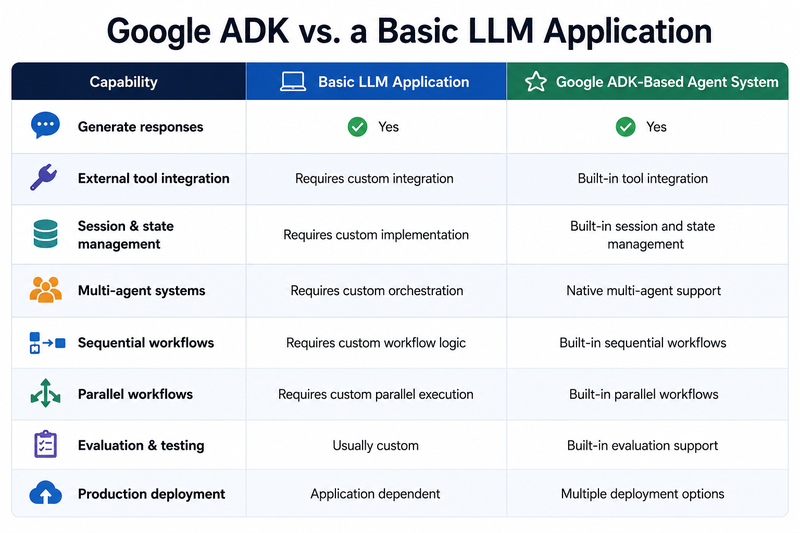
This does not mean every LLM application should migrate to an agent framework. The additional architecture is justified only when the application requirements demand it.
The Bigger Picture: From LLM Apps to Agentic Systems
The significance of frameworks such as Google ADK extends beyond individual features.
The first generation of generative AI applications focused primarily on improving model outputs.
Agentic applications shift part of the engineering challenge toward system design.
Developers now need to answer questions such as:
- Which decisions should the model make?
- Which decisions should remain deterministic?
- What tools should an agent access?
- What state should persist?
- When should agents delegate work?
- Which actions require human approval?
- How should failures be recovered?
- How will the system be evaluated and monitored?
The quality of the underlying LLM still matters, but reliable agent systems depend equally on orchestration, permissions, tools, infrastructure, and evaluation.
That is where ADK becomes valuable: it provides a structured framework for engineering those components instead of treating an AI agent as a single prompt wrapped around an API.
Conclusion
Google Agent Development Kit provides developers with a structured approach to building AI applications that can reason, use tools, maintain state, and coordinate complex workflows.
Its support for LLM-driven agents, deterministic workflow agents, multi-agent architectures, tools, sessions, evaluation, and multiple deployment models makes it particularly relevant for organisations moving from experimental AI prototypes toward production systems.
But using an agent framework does not automatically make an application production-ready.
Reliable AI agents still require carefully designed tools, strong authentication and authorisation, controlled state management, comprehensive evaluation, observability, security controls, and appropriate human oversight.
The practical goal should therefore not be to make an AI system as autonomous as possible. It should be to give the system the right level of autonomy for the task while keeping its actions observable, testable, and controlled.
For organisations exploring AI agent development, multi-agent systems, LLM integration, or enterprise AI automation, Golden Eagle IT Technologies can help design and develop agentic AI solutions aligned with existing business workflows and technology infrastructure.
Frequently Asked Questions
What is Google Agent Development Kit (ADK)?
Google Agent Development Kit is an open-source framework for developing, evaluating, debugging, and deploying AI agents. It provides components for agents, tools, orchestration, sessions, events, and multi-agent workflows.
Is Google ADK open source?
Yes. Google describes ADK as an open-source agent development framework.
Is Google ADK only for Gemini?
No. ADK is designed as a flexible framework and is not limited conceptually to a single model. Developers should verify the integration and feature support available for the model provider and ADK language implementation they plan to use.
Does Google ADK support multi-agent systems?
Yes. ADK natively supports multi-agent architectures and workflow patterns that allow specialised agents to collaborate, delegate tasks, and execute sequential or parallel processes.
What programming languages does Google ADK support?
As of July 2026, Google's current documentation lists ADK support for Python, TypeScript, Go, and Java.
Can Google ADK agents be deployed to Cloud Run?
Yes. Google provides official documentation for building and deploying ADK agents to Cloud Run.
Is Google ADK suitable for enterprise applications?
It can be. ADK provides many of the architectural components needed for enterprise agent systems, but production readiness also depends on the surrounding application's security, infrastructure, evaluation, observability, governance, and operational controls.
When should you not use Google ADK?
For simple FAQ bots, basic prompt-response applications, or use cases that do not require tools, state, orchestration, or multi-agent capabilities, a full agent framework may add unnecessary complexity.